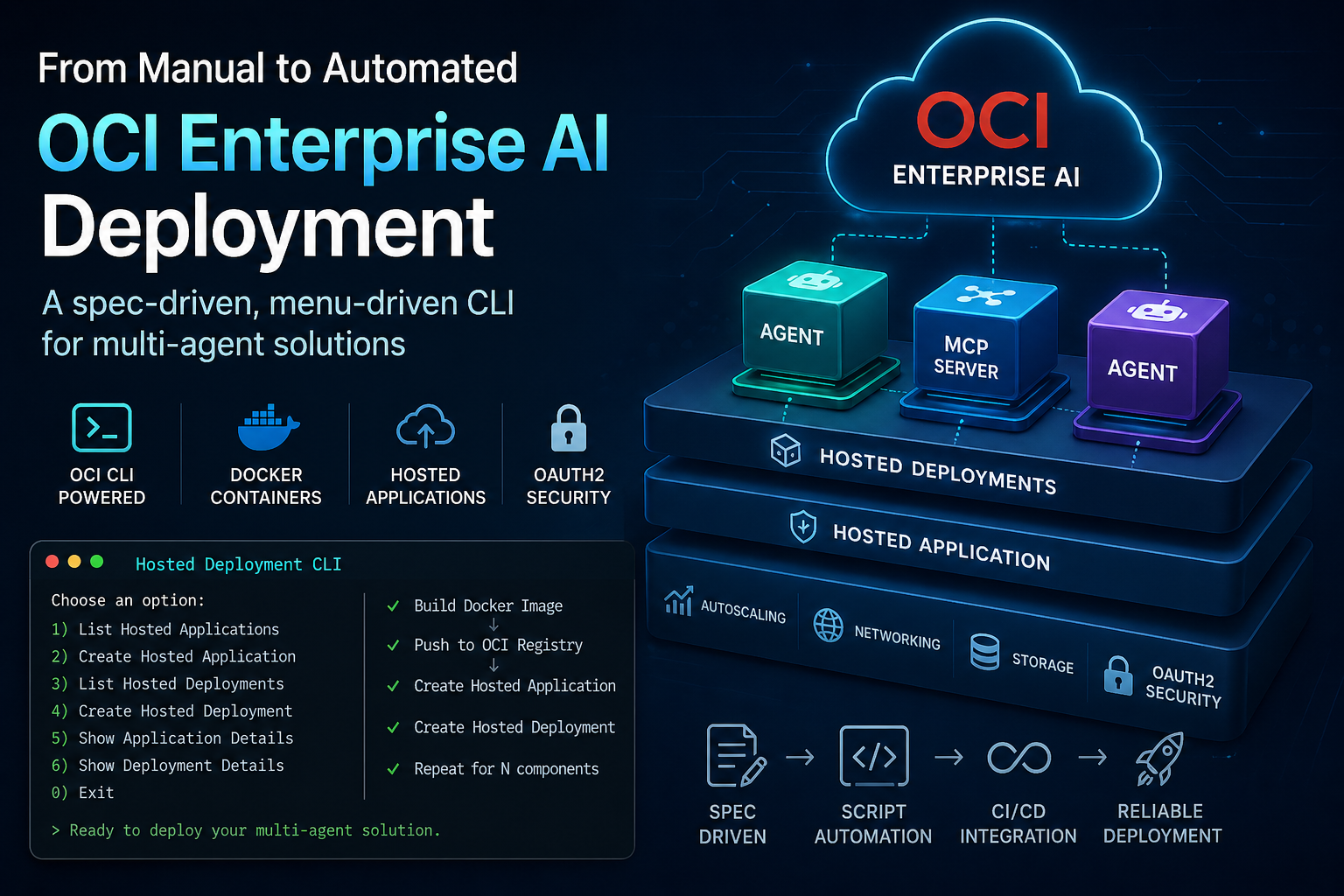
Deploying a multi agent solution on OCI Enterprise AI follows a structured workflow where consistency, precision, and repeatability are key.
For each component in the solution, whether it is an agent or an MCP server, we typically need to perform a sequence of steps:
- build a Docker container that complies with the required runtime interface,
- push the container image to a registry on OCI,
- create and configure a Hosted Application,
- define settings such as autoscaling, networking, security, and OAuth2 authentication,
- create a Hosted Deployment inside the Hosted Application, using the container image.
And, of course, this process has to be repeated for all the components in the multi agent architecture.
OCI Enterprise AI platform provides the managed runtime needed to build, deploy, and govern AI applications at enterprise scale. Hosted Applications centralize operational settings such as autoscaling, storage, networking, and authentication, while Hosted Deployments use container images to run the actual workload.
The UI is great for prototyping, but not enough for CI/CD
The whole process is supported by the OCI Console. For prototyping, demos, and early development, the graphical interface is extremely useful. It allows us to understand the concepts, experiment with the configuration, and validate the deployment flow without writing much automation.
However, when we move from a prototype to a real engineering process, the situation changes.
If we want to integrate the deployment of our multi agent solution into a proper CI/CD pipeline, using the UI is no longer the right approach. We need scripts. We need configuration files. We need versioning. We need repeatability. We need to be able to run the same deployment process today, tomorrow, and in a customer environment, with predictable results.
This is where OCI Enterprise AI gives us the right foundation.
The same operations that are available from the Console are also exposed through the OCI CLI. The OCI CLI includes commands for managing Generative AI Hosted Applications and Hosted Deployments, including creating applications, creating deployments, listing resources, and working with Docker based artifacts.
In practice, the deployment automation is built around commands like:
oci generative-ai hosted-application create
and:
oci generative-ai hosted-deployment create
The Hosted Application creation command supports complex parameters such as scaling configuration, inbound authentication configuration, networking configuration, storage configuration, and environment variables. These can be provided as JSON, or generated as examples using the OCI CLI and then customized.
By combining these OCI CLI commands with standard Docker commands, we can create the scripts we need for our deployment process.
Taking one step further
At this point, I asked myself a simple question.
Since this is an activity I expect to repeat many times in the coming months, both internally and with customers, why not make it simpler, safer, and more guided?
Instead of writing a set of isolated scripts, I decided to experiment with a slightly more structured approach.
I started designing a text based menu interface that guides the user through the main steps of the deployment process. The goal is not to replace CI/CD pipelines. The goal is to make the deployment workflow easier to understand, easier to validate, and easier to turn into reusable automation.
The first version of the utility is available in this repository:
https://github.com/luigisaetta/oci-enterprise-ai-deployer
The current implementation provides a text based utility to manage OCI Enterprise AI resources through the OCI CLI. It supports operations such as getting Hosted Application details, getting Hosted Deployment details, listing Hosted Applications by region and compartment, creating Hosted Applications, and creating Hosted Deployments inside a Hosted Application.
Why a text based menu?
A text based menu may look old school, but it has some important advantages in this context.
It is simple to run from a terminal.
It makes the workflow explicit.
It helps avoid mistakes when dealing with long OCIDs, compartment identifiers, Docker image URIs, and JSON configuration files.
It can be used interactively during development, but it can also help define the structure of the final automation scripts.
It provides a bridge between manual experimentation and fully automated deployment.
For example, the menu can ask for the display name of a Hosted Application, the compartment name or OCID, and an optional description. It can also accept JSON files for advanced configuration, such as scaling, inbound authentication, networking, storage, and environment variables. The utility then translates these inputs into the corresponding OCI CLI command.
For Hosted Deployments, the tool supports two modes:
- using a full active artifact JSON,
- using a guided Docker mode, where the user provides the container URI and tag.
This makes the workflow more approachable, especially when deploying several agents and MCP servers that follow the same pattern.
Spec driven development
The most interesting part of this experiment, at least for me, is not the menu itself.
The interesting part is the process I used to build it.
I wanted to run another experiment with spec driven development.
Instead of starting directly from the code, I started from the specification. I described the intended behavior, the menu structure, the commands to support, the configuration model, the expected input flow, and the safety constraints.
The specification became the reference point for the implementation.
This approach is particularly useful when working with AI assisted coding tools. A clear specification reduces ambiguity. It helps the coding assistant understand what needs to be built. It also makes the final result easier to review, because we can compare the implementation against the original intent.
In other words, the specification is not just documentation written after the fact. It is the design artifact that drives the implementation.
Safety and repeatability
When automating cloud deployments, especially in shared or customer environments, safety matters.
The utility does not store secrets. It does not write OCIDs into the repository. Create operations ask for confirmation before running the OCI CLI. The active OCI profile and region can be controlled through environment variables, and the OCI CLI configuration remains the foundation for authentication and authorization.
This is important because deployment automation should not only be fast. It should also be transparent and auditable.
A guided tool can help users understand which command is being executed, which parameters are being passed, and which OCI resources are being created.
From prototype to pipeline
The long term direction is clear.
The text based menu is useful during development, demos, workshops, and customer enablement sessions. But the same underlying logic can be reused to generate or validate scripts that become part of a CI/CD pipeline.
This gives us a gradual path:
- start from the OCI Console to understand the service,
- move to the OCI CLI to make the process repeatable,
- introduce a guided menu to reduce complexity and errors,
- extract reusable scripts and configuration files,
- integrate everything into CI/CD.
This is, in practice, the journey from manual deployment to production grade automation.
Conclusion
Deploying a multi agent solution on OCI Enterprise AI requires several precise steps, repeated across multiple components. The OCI Console is excellent for learning and prototyping, but real world delivery requires automation.
The OCI CLI provides the foundation for that automation.
A text based menu can make the process easier to learn, safer to execute, and more repeatable.
And spec driven development provides a disciplined way to move from idea to implementation, especially when working with AI assisted coding tools.
This small project is an experiment, but it is also a practical step toward a more robust deployment workflow for multi agent solutions on OCI Enterprise AI.
Updates:
[1] (30/04/2026) I have moved the code to a dedicated repository: https://github.com/luigisaetta/oci-enterprise-ai-deployer


